
5 Ways AI Is Changing How Kansas City Small Businesses Work in 2026
Five ways Kansas City small businesses are putting AI to work in 2026: one company AI workspace that automates repetitive work, a company brain, internal apps, answering every call and getting found in AI search. Real examples from our client work.


KEY TAKEAWAYS
Five ways AI is changing how Kansas City small businesses work:
- A company ChatGPT workspace replaces personal AI accounts and automates repetitive work like document processing and reports.
- Voice AI and website chatbots answer calls and questions at any hour and book appointments.
- A company brain organizes your products, pricing, processes and policies so every AI tool answers from your facts.
- Internal apps replace spreadsheets and copy-paste with tools built around your process, and can run on a private LLM when data is sensitive.
- AI search optimization gets your business named when customers ask ChatGPT or Perplexity for a recommendation.
On this page
Where Small Businesses Stand With AI in 2026
Most small businesses have tried AI, but few have built it into how they run. Census data shows about one in five US businesses uses AI in a business function, while broader surveys find most small businesses use some kind of AI tool. That gap is where the five ways below come in.
- As of May 2026, 19.8% of US businesses used AI in a business function in the past two weeks. That rises to 37% at firms with 250 or more employees and stays below 20% at firms with 1 to 4 employees (US Census Bureau, 2026).
- In October 2026, 66% of small businesses said they use AI, including 56% in Missouri and 68% in Kansas (US Chamber of Commerce, 2026).
- The Chamber asks about any AI tool, including chatbots. Census asks about AI inside business functions.
1. Give Your Team One Company AI Workspace
A company AI workspace puts your whole team on one managed account instead of personal AI accounts. A ChatGPT Business workspace gives you admin controls, shared projects and one bill, and OpenAI says it does not use Business data to train its models by default (OpenAI). It is also where repetitive work gets automated.
Why it matters:
- Workers use AI in their tasks at 23% of firms, compared with 18% of firms that use AI in a business function (US Census Bureau, 2026).
- In more than a third of the firms where workers use AI, the business has not formally adopted it, so company information can end up in personal accounts nobody manages.
- 46% of employer firms say the business or its employees use AI, and writing or marketing is the most common use (Federal Reserve Banks, 2026 Report on Employer Firms).
What a workspace can automate:
- Processing documents and pulling out key fields.
- Preparing recurring reports.
- Copying data between systems and sending confirmations.
- Recurring tasks run by workspace agents, which OpenAI introduced in April 2026 for jobs like preparing reports and responding to messages (OpenAI, 2026).
Real example: we set up a lab-report workflow inside an environmental consulting client's AI workspace. It cut their lab-report data entry from about an hour per report to about five minutes. Larger workflows that span several systems can be built as dedicated automations. For plans and setup, see our ChatGPT workspace guide.
2. Answer Every Call and Website Question
Voice AI answers your phone and a website chatbot answers questions on your site, at any hour. Both work from your approved business information, book appointments on your calendar and hand the conversation to your team when needed, so missed calls and unanswered questions stop turning into lost customers.
What they handle:
- Common questions about services, hours and pricing.
- Appointment booking during the call or chat.
- Transfers to your team, with a summary of what the customer already said.
Real example: an HVAC company we work with runs a Voice AI agent on its main line. It answers inbound calls, covers after-hours calls and books service visits straight into the company calendar. For how Voice AI compares to a traditional phone menu, see Voice AI vs traditional IVR.
3. Build a Company Brain Your AI Can Trust
A company brain is one structured knowledge base of your products, pricing, processes, policies and past decisions. AI only knows what you give it, so without one it guesses. With one, every AI tool you use, from your workspace to your voice agent, answers from the same accurate facts.
How it is built:
- Gathered from your documents, spreadsheets and recordings.
- Cleaned first, because AI treats everything it reads as true: duplicates, outdated versions and conflicting facts are sorted out before any AI touches it.
- Sensitive personal identifiers are kept out.
- Connected to your CRM, email, scheduling and accounting tools through Model Context Protocol (MCP).
What you get:
- One source of truth for how your business works, what it sells and who it serves.
- AI answers based on your facts instead of guesses.
- A clear picture of which workflows to automate next.
4. Build Internal Apps Around How You Work
An internal app replaces the spreadsheets, copy-paste and almost-right software many small businesses run on. Instead of quotes going out with errors and two people editing the same file, your team works in one tool built around your process, with AI features where they save the most time.
Common builds:
- A dashboard or internal tool that replaces the spreadsheet your business runs on, with user permissions and live reporting.
- Quoting, booking, ordering or onboarding portals for your customers.
- AI features inside your workflows: drafting quotes, reading invoices, summarizing requests and answering questions from your own documents.
Real example: we built a web design firm a client feedback platform. Clients pin feedback directly on live site previews, with no account needed. AI summarizes each request, turns it into a development task and sorts it by risk. Code changes go to a review branch, and AI can never deploy to production without a human in the loop.
The AI inside an internal app can also stay private. It can run on a private LLM on your own hardware, so your data stays in your building. A Kansas City real estate firm we work with runs its business document processing through a local LLM for exactly that reason.
5. Get Found When Customers Ask AI
AI search optimization gets your business named when customers ask ChatGPT, Perplexity or Google AI for a recommendation. It makes your business information clear and consistent for AI engines, then keeps tracking what they cite, because the sources and patterns they favor keep changing and competitors are working on the same answers.
What the work covers:
- Consistent business information across your website and listings.
- Question-and-answer content that matches how customers ask.
- Schema markup and access for AI crawlers.
- Monitoring which sources and content patterns AI engines cite, and optimizing your content to match.
- Competitor monitoring that compares your AI visibility with theirs.
Real example: we rebuilt a law firm's website for AI search. In the first 60 days after launch, the share of AI answers mentioning the firm rose from 21.2% to 55.0% across ChatGPT, Perplexity and Google AI Overviews, moving it from third to first among six tracked firms. Its website also became the top-ranked source those engines cited.
Will AI Replace Your Employees?
For most small businesses, no. A 2026 Census Bureau working paper found that AI-related employment decreases happened at only 2% of firms (US Census Bureau, 2026). The goal of each of these five ways is to let your existing team handle more work, make fewer errors and spend more time with customers.
Where to Start
Start with the bottleneck that costs you the most. Get one system working, measure it, then add the next:
- Staff using AI on personal accounts, or hours lost to data entry and paperwork: start with a company AI workspace.
- Calls going to voicemail: start with Voice AI.
- AI tools giving generic or wrong answers about your business: start with a company brain.
- Spreadsheets and copy-paste holding the business together: start with an internal app.
- Customers not finding you: start with AI search optimization.
Not sure where your business fits? See which industries benefit most from AI.
Getting Started With 360 Automation AI
360 Automation AI works with small businesses in Kansas City and across the Midwest. Here is how we help with each of the five:
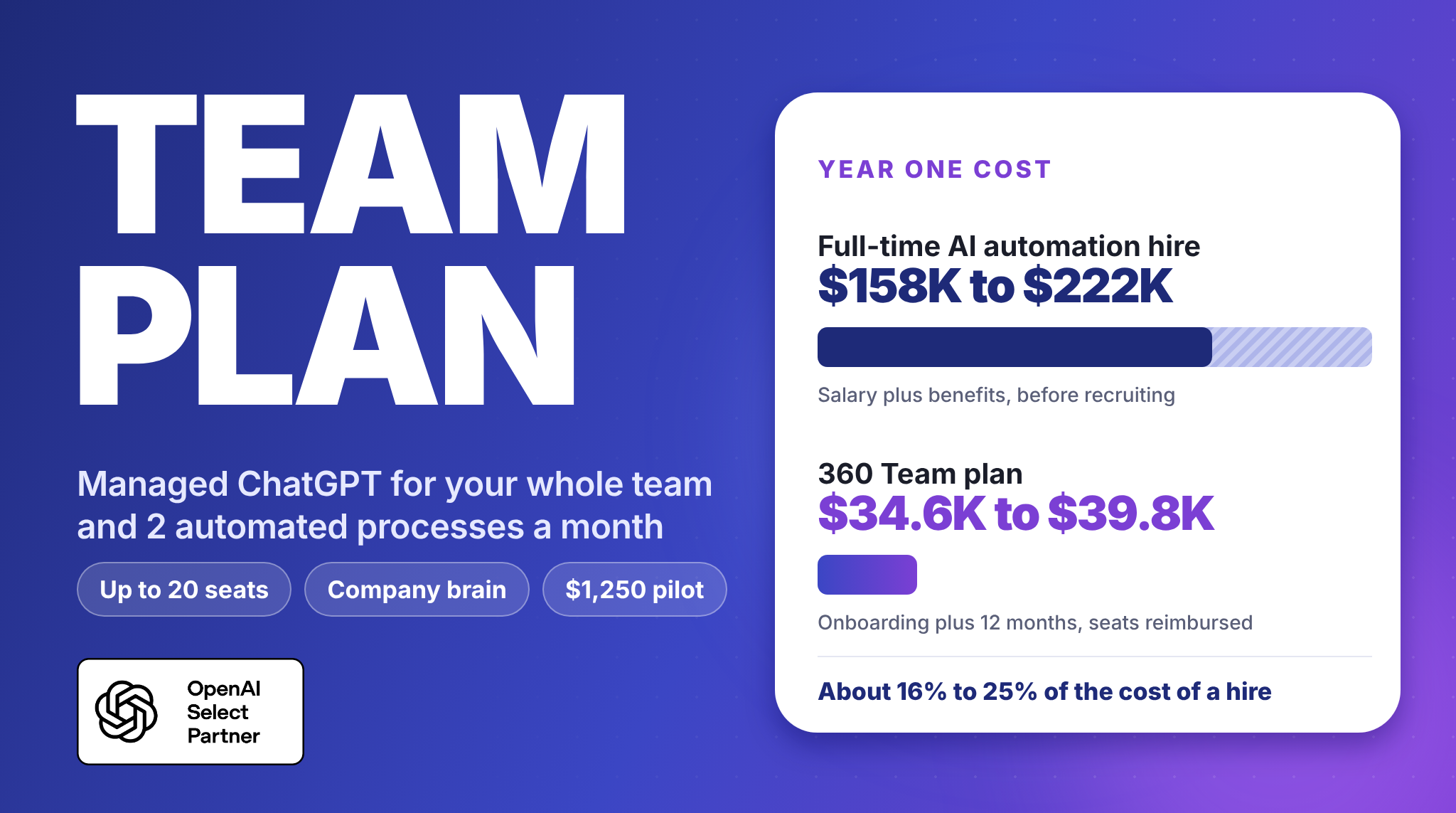
- One company AI workspace: the ChatGPT Workspace Pilot is $1,250 one-time for 2 teammates plus one automated workflow. The Team plan is $2,899 a month (current promotional price) plus a $4,997 one-time onboarding fee, and covers ChatGPT Business for up to 20 employees with standard seat costs reimbursed, plus up to 2 business processes automated every month.
- Answer every call and website question: Voice AI costs $2,500 to $6,000 to set up and $500 to $1,200 a month. A website chatbot costs $3,000 to $7,000. Both go live in 1 to 3 weeks.
- A company brain: an Agent-Ready Infrastructure build costs $3,497 to $9,997 and takes 2 to 5 weeks. Company brain maintenance is included in our monthly plans.
- Internal apps: Custom AI Software starts with a $2,500 Discovery Sprint (1 to 2 weeks) that gives you a clickable prototype and a fixed-price build plan. Custom builds run $15,000 to $45,000 over 4 to 10 weeks, with a live demo every week, and you own the code. For a private model, Local LLM Setup is $4,997 one-time and takes 2 weeks.
- Get found in AI search: the AEO/GEO Pro Package runs $2,800 to $5,000 a month. Setup takes about 3 weeks, mentions for your own name usually appear in weeks 3 to 6, and regular mentions for broader industry questions build from weeks 6 to 16.
It starts with a free discovery call. We look at where your business loses time and customers, tell you which of these five fits first, and give you a plan if it makes sense to move forward.
Want a real answer for your business?
Book a free 30-minute call. We look at your setup and tell you what it would cost and return.
BOOK A CALLFrequently asked questions
How much does AI automation cost for small Kansas City businesses?
Monthly plans at 360 Automation AI start at $1,497 a month plus a $3,497 onboarding fee for one fully managed AI agent. Standalone projects are priced one at a time. A website chatbot costs $3,000 to $7,000 to build, with an optional Care Plan after launch, and Voice AI costs $2,500 to $6,000 plus $500 to $1,200 a month. Most businesses start with one project and expand once it proves its return.
Will AI automation replace my employees in my Kansas City business?
No. AI automation takes over routine tasks so employees can focus on strategy, creative work and customer relationships. The goal is to let your existing team handle more volume, not to cut staff. Writing assistants produce first drafts that people refine, and research and scheduling tasks run in the background so your team spends more time with customers.
How long does AI implementation take for Kansas City small businesses?
It depends on the service. Chatbots and Voice AI go live in 1 to 3 weeks, Agent-Ready Infrastructure takes 2 to 5 weeks by tier, and Business Process Automation 2 to 8 weeks. A monthly plan starts with an onboarding build of 2 weeks for Foundation, 4 weeks for Team and Growth, and 5 weeks for Enterprise. Data readiness and scope clarity are the biggest variables.
What is the best first AI project for a small business?
Start with the bottleneck that costs you the most right now. If calls go unanswered after hours or during busy periods, start with Voice AI. If website visitors leave without an answer, start with a chatbot. If your staff use AI on personal accounts, start with a company ChatGPT workspace. Prove the return on one simple tool, then expand based on results and team comfort.
Can an AI chatbot handle customer support around the clock without frustrating customers?
Yes, for routine questions, when it is trained on your business. A website chatbot answers common questions 24/7, captures leads and books calls, and connects to your CRM and calendar. When a question goes beyond what it knows, it takes down the contact details of the visitor so your team can follow up, and nobody is left without a next step.
More from the blog
See all articles →
Not sure where AI fits in your business?
Book a free 30-minute call. We look at your setup and tell you what it would cost and return.